Here’s an embarrassing truth about our webhooks: if you pointed one at a Slack incoming webhook, Slack rejected it. Instantly. Slack expects a message shaped like {"text": ...}, we sent our full JSON alert payload, and Slack answered every single delivery with 400 invalid_payload. Discord was no friendlier. The webhook system itself was solid — per-monitor filtering, delivery history, automatic retries — but for the two places most teams actually live, it was a dead end unless you stood up Zapier or a translation lambda in between. For an alert about your site being down, “first, deploy a middleman” is not an acceptable setup step.
So we fixed it at the source.
Pick a Destination, Paste a URL
When you add a webhook in FlareWarden, you now pick where it’s going: Slack, Discord, or a custom endpoint (existing webhooks are untouched — they keep working exactly as before). Choose Slack or Discord, paste the incoming-webhook URL from your workspace or server, and you’re done. The create flow walks you through getting that URL and shows you what the message will look like before you commit.
We also check the URL as you paste it. The two mistakes everyone makes — grabbing a Slack workflow URL instead of an incoming webhook, or copying Discord’s /slack-suffixed compatibility URL — are caught right there in the form, not discovered three days later when an alert silently bounces.
Messages, Not Payloads
Every alert arrives as a real message: a clear title, a severity color so you can triage from across the room, the facts that matter — which monitor, what happened, when it started — and a button that jumps straight to the monitor in FlareWarden.
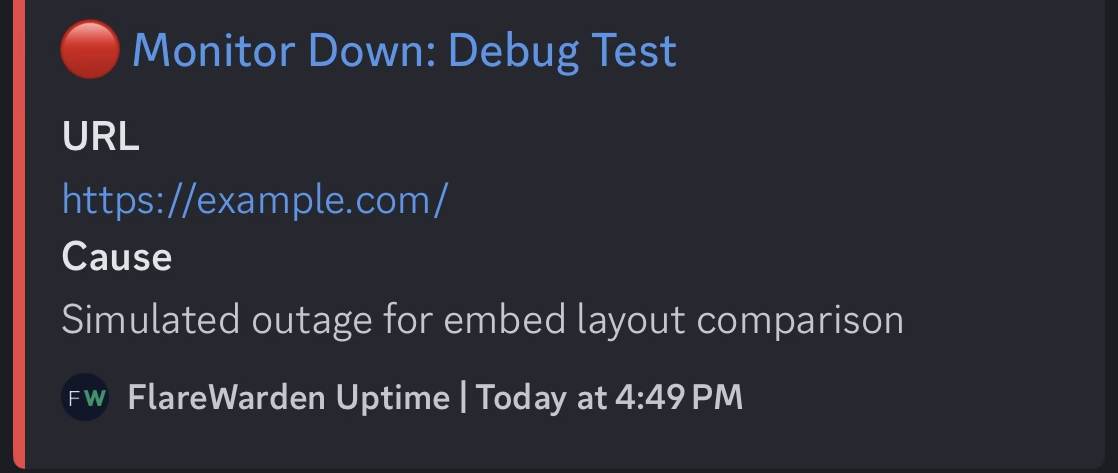
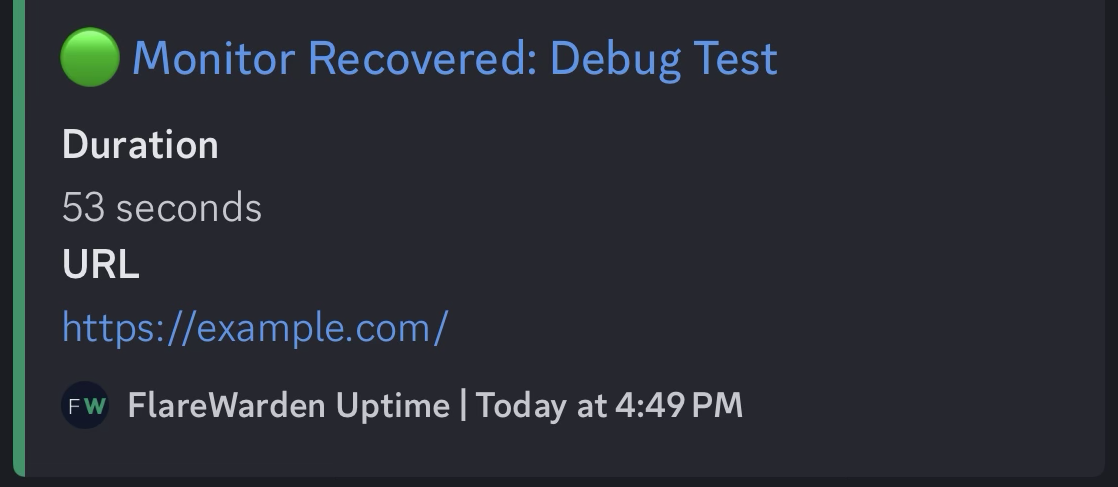
Real alerts from our launch validation — a down alert and its recovery, as they landed in Discord.
Some details we sweated: timestamps render in each reader’s local time — your teammate in Berlin and your teammate in Denver see the same incident at their own clock, with no “wait, is that UTC?” conversation. Every message carries a plain-text summary too, so desktop and mobile notification previews say “Monitor Down: example.com” instead of showing an empty notification. On Discord, alerts are native embeds with a color strip — red for down, green for recovered, amber for warnings.
Everything the Webhook System Already Did, You Keep
Slack and Discord destinations ride the same pipeline as every other webhook. Filter a destination to specific monitors so #storefront-alerts only hears about the storefront. Subscribe it to exactly the events you want — incidents, SSL expiry, DNS changes, anomalies. Check the delivery history when you’re curious, and if a delivery ever fails, it’s retried automatically (with a manual retry button for good measure). There’s a Send test button so you can see a message land in your channel before any real incident does.
One fix worth calling out while we were in there: SSL and DNS alerts now respect per-monitor filters. Previously a webhook filtered to three monitors could still receive SSL-expiry alerts for every monitor on the account. That’s corrected for all destinations, including existing custom webhooks.
What It Costs
Nothing extra. A Slack or Discord destination is just a webhook, and it draws from the webhook allotment your plan already includes — every plan has webhooks, including free. No add-on, no per-message pricing, no gated “integrations tier.”
Why the Beta Label
The feature is complete — formatting, filtering, retries, delivery history, the works — and it’s live for everyone today. We’re calling it beta because message formatting meets the real world in thousands of differently-configured workspaces, and we want a feedback cycle before we take the label off. If a message renders oddly in your Slack or Discord, or a detail you need is missing from a card, tell us via the feedback button in the app. That input directly shapes what ships next.
What’s Next
Microsoft Teams is the most requested third destination, and we’ve already done the research on Teams’ workflow-based webhooks. It’s coming later — we’re not putting a date on it — and the beta feedback from Slack and Discord will make it better when it lands.
Try It
If you’re already using FlareWarden, open Integrations, click Add Webhook, and pick Slack or Discord — the whole thing takes about two minutes. The step-by-step guides live in the Slack documentation and Discord documentation. We’ve since written up the thinking that goes around the setup: how to design channels and live with Slack’s rate limit in Slack downtime alerts, and the same ground for Discord downtime alerts. If you’re new, create a free account and put your first monitor’s alerts where your team will actually see them.
Your site’s next incident is going to be announced somewhere. It might as well be the channel your team already has open.